data model
Orders, Products, and Shipments
This is the “what” of the data model — what are we trying to deliver or collect?
Optrak keeps five separate things: orders, the lines on them, the products themselves, the containers they travel in, and shipments. Most routing software boils all of that down to one quantity per customer before it starts planning. Keeping the five apart is what lets the optimiser work out what can go out together, what needs a particular vehicle, and how it all packs — while it is building the round, rather than in a separate step afterwards.
Last updated: 2026-08-11
Key Capabilities
- Five things kept separate: orders, the lines on them, products, the containers they travel in, and shipments
- Orders carry their own earliest and latest times, separately from when the site is open — so a booked delivery slot is honoured
- An order can run from one site to one, from one to many (distribution), or from many to one (collection)
- Products carry their own detail — what they are, dangerous goods (ADR) codes, unit size, stacking rules — and what vehicles they can go on is checked while the round is being built
- Shipments gather lines from more than one order into the same container, so two orders to a shop share a roll-cage instead of taking one each
Most routing software treats a customer as a place with a quantity attached. Optrak keeps more than that — the orders, the lines inside them, the products, the containers they pack into, and the shipments that go on the vehicle. So when two orders to the same site need different vehicles, or turn up at the depot at different times, that becomes something to plan around rather than something to work around.
Why “A Customer and a Quantity” Isn’t Enough
Most routing software treats a customer as a place with a quantity attached — usually a weight, a volume, or both, though some products allow a few more measures than that. It works perfectly well when two orders to the same site are interchangeable: ready at the same time, able to go on the same vehicle, due in the same window, and no consequences from putting them together.
When they are not interchangeable, that single quantity leaves the planner with two poor choices. Put them together as one delivery and lose whichever timing mattered most. Keep them apart as two visits and pay the fixed time at that site twice when once would have done. Either way the customer gets a worse service: a late delivery, or an unnecessary cost on every drop. Planners can work around it with rules and made-up product codes, but the software can’t see what is being worked around — so it can’t weigh up the choice, and the planner ends up rebuilding the plan afterwards.
Optrak handles this by keeping five things separate — orders, the lines on them, products, the containers they travel in, and shipments — and putting all five in front of the optimiser, rather than one quantity per customer. Two cases show what that buys.
Worked Example 1: One Order, Split Across Vehicles
A car dealership orders 1000L of bulk motor oil and 2 pallets’ worth of packaged lubricants on a single order. The delivery fleet comprises bulk multi-pot tankers, some flatbeds and 2 hybrid vehicles that use IBCs and on-board pumps. The smart shipment builder recognises the bulk/packaged combination within the order and splits it into 2 shipments, bulk and packaged.
In one scenario, both a bulk tanker and a flatbed are required already in the same area as the dealership. The optimiser decides to keep the shipments separate, incurring an extra fixed component on the delivery time but allowing the hybrid to be used elsewhere.
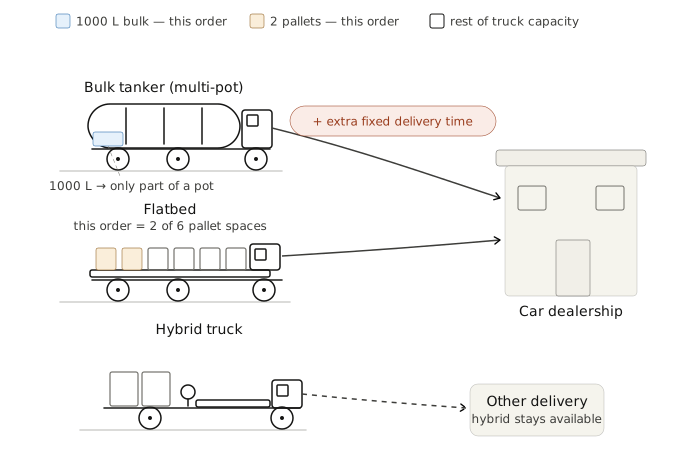
Scenario one: shipments kept separate. A bulk tanker and a flatbed already working the area each make a delivery — two fixed delivery times — but both hybrids stay available for other work.
In the opposite scenario, the optimiser decides to keep the shipments together and use the hybrid truck.
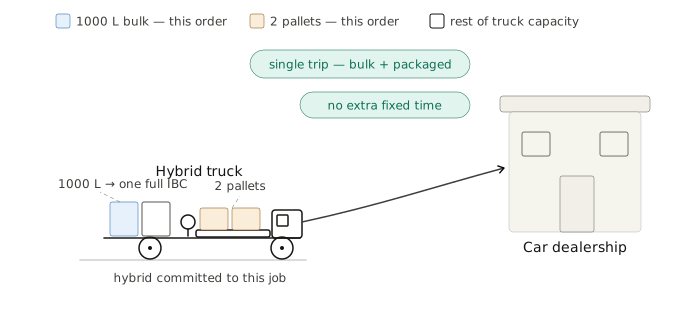
Scenario two: shipments combined on a hybrid. One trip, one fixed delivery time — at the cost of committing a scarce hybrid vehicle to this job.
Worked Example 2: Two Orders Sharing Roll-Cages
A convenience store places its regular order for the day — some ambient grocery lines and some frozen. A couple of hours later, before the round is built, it phones in a small top-up: a few more ambient lines and a little extra frozen. That late add-on arrives as a second order against the same store, for the same delivery day.
Ambient and frozen can’t share a roll-cage — the frozen lines need a frozen cage, the ambient lines an ambient one. Treated as two separate shipments, the two orders need four cages: the main order fills its ambient and frozen cages nicely, but the little add-on produces a second ambient cage and a second frozen cage that are barely a quarter full. And a roll-cage that’s a quarter full still takes a full cage’s footprint on the vehicle.
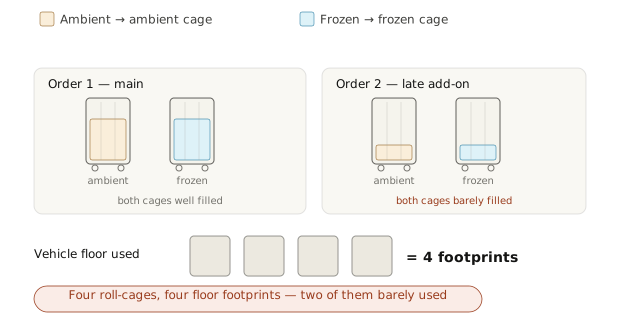
Kept separate: four roll-cages, two of them almost empty — four cage-footprints of vehicle floor for goods that would fit in two.
Optrak’s shipment builder spots that both orders go to the same store on the same day and aggregates their order lines by temperature: all the ambient into one ambient cage, all the frozen into one frozen cage. Two well-filled cages instead of four — half the floor space, with no change to what the store receives.
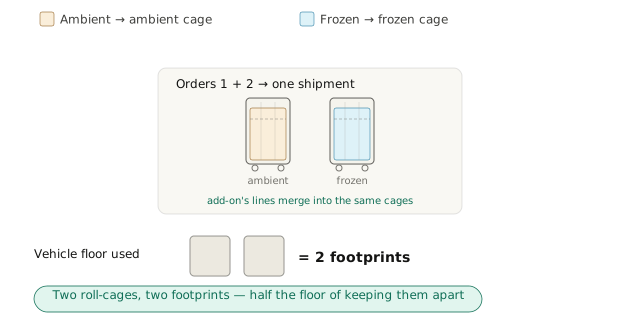
Combined: the late add-on’s lines merge into the existing cages. Two cages, two footprints — the same goods in half the vehicle floor.
Technical Detail
Orders move goods between sites — depots and customers. Sites are covered on their own page, Sites; what follows is what Optrak keeps on top of them.
Orders
An order is a request to move goods from one or more sites to one or more sites, with earliest and latest collection and delivery times. The from/to pattern can be one-to-one, one-to-many (distribution from a depot), or many-to-one (collection or consolidation). Order earliest/latest times are independent of site opening hours, which is what allows booked deliveries — a site is open from 8am, but the customer requested a 10:00-11:00 delivery slot.
Order Lines
Each order has one or more order lines. A line carries a quantity, which product it is, and the dimensions where those can’t be worked out from the product and the quantity. Lines are the level at which packing is worked out and at which part of an order can be sent on ahead.
Products
A product carries what it is, dangerous goods (ADR) codes, unit size, and the rules for loading and stacking it. What vehicles it can go on is set here too — bulk against packed, temperature requirements, whether an ADR-certified vehicle is needed — and it is checked while the round is being built, not filtered out afterwards.
Intermediate Containers
Goods travel grouped into something — a pallet, a roll-cage, a stillage, a tote — and Optrak treats that container as a thing in its own right, with its own dimensions and its own packing rules. The type is deliberately open: whatever your operation groups goods into to handle them, you describe it and the optimiser plans around it.
The room an order takes up on a vehicle is not simply its lines added together — it depends on how those lines pack into containers, and how the containers sit in the vehicle. A roll-cage half full of one product still takes a whole roll-cage’s worth of floor space.
Shipments
A shipment gathers lines from one or more orders that are going to the same place, packed into one or more containers. If a customer has two orders ready at the same time, a shipment can put the lines from both into a single roll-cage rather than two. Large orders can be split across several shipments, and an individual line can be split too. The shipment is what actually gets placed on a vehicle.
How This Compares
Other routing systems know about orders too — your customer-service team takes them, your dispatchers work with them all day. The real question is what the optimiser sees. In most routing-focused products, each customer’s orders are boiled down to a single demand figure before the optimiser runs. The optimiser solves that simpler problem, and the order detail is stitched back on afterwards. That works fine when two orders to the same site are interchangeable — but it falls apart in exactly the cases above, and the gap is widest in operations like mixed bulk/packed deliveries or multi-temperature distribution with split loads. Optrak keeps the orders whole, all the way into the optimiser.
Frequently Asked Questions
What’s the difference between an order and a shipment in Optrak?
An order is a commercial object — a request from one or more sites to one or more sites, with earliest/latest times, an associated set of order lines, and (typically) paperwork. A shipment is a physical object — an aggregation of order lines, possibly across multiple orders to the same destination, that gets packed into intermediate containers and loaded onto a vehicle. The shipment is what the loading and routing optimiser actually places onto a trip; the order is how the customer or the dispatch desk thinks about it. Two orders to the same site can be served by one shipment, sharing a roll-cage.
Can a single order have multiple delivery sites?
Yes. Orders can be one-to-one, one-to-many, or many-to-one — a single collection point with multiple deliveries, or multiple collection points consolidating into one delivery. The only configuration Optrak doesn’t represent as a single order is many-to-many, which is structurally a different problem and is modelled as multiple orders.
How does Optrak handle products that can only go on certain vehicles?
Vehicle/product compatibility is defined on the product, the vehicle, and where applicable the combination of tractor, trailer, and customer site. Examples include bulk-only tankers that can’t carry packed goods, multi-temperature trailers where products are tied to compatible compartments, and ADR-restricted products that need certified vehicles and certified drivers. The optimiser checks all applicable compatibility constraints when considering any move that would put a product on a vehicle.
Why does it matter whether the optimiser sees the orders or just a total?
Because a total throws away things the optimiser needs to know. If a site has two orders that came in at different times, or are due on different days, or ought to go together for one reason and separately for another, a single total can’t hold any of that. The software is then left with two poor choices: treat them as one delivery, and lose the timing, or treat them as two visits, and pay the fixed time at that site twice. Pigden 2013 sets out the cases where it matters.
How are dangerous goods handled?
Products carry ADR (European dangerous goods) codes where applicable. Compatibility is enforced product-to-product (some products can’t share a compartment), product-to-vehicle (some require ADR-certified vehicles), and product-to-driver (some require ADR-certified drivers). The optimiser respects all of these as hard constraints during route construction and modification.
Can orders be split or partially delivered?
Yes, where the customer allows it and the order line permits it. A split can come about because the order won’t fit on one vehicle, because different lines on it are due at different times, or because the round calls at that site twice across two days. Holding the order line by line is what makes that possible: a single total per customer can’t express “some of it now, the rest tomorrow”.
Related
Technical Summary
Optrak’s data model uses five distinct entities, all of which reference sites — the plannable locations (depot, customer, public charger, rest stop) covered under Sites. Orders are requests from one or more sites to one or more sites (one-to-one, one-to-many, or many-to-one), with earliest/latest times independent of site opening hours. Order lines carry quantity, product reference, and dimensional data, and are the granularity at which packing and partial fulfilment are modelled. Products carry categorisation, ADR codes, unit size, and loading/stacking rules; vehicle/product compatibility is product-level. Intermediate containers — a pallet, a roll-cage or anything similar goods are grouped into to be handled — have their own dimensions and packing rules, so order volumes do not sum linearly. Shipments aggregate order lines across orders into intermediate containers, so two orders to the same destination can share a roll-cage rather than each taking its own (Pigden 2013). The architectural distinction from the standard CVRP formulation is that the optimiser reasons about all five entities directly rather than against a flattened scalar demand; this is what makes the order-distinguishing cases above — co-delivery decisions, vehicle/product compatibility, differing service levels, and container-level packing — tractable inside a single optimisation loop.
Reference: Pigden, T. (2013). “Missing from the Model: Orders, Drivers, Tractors and Trailers and Non-Linear Loading.” GECCO ‘13 Companion, 1079–1084. DOI: 10.1145/2464576.2482686.
See Optrak on Your Own Routes
Book a demo and we'll model your fleet, depots and constraints — and show the savings on real data.